English
- English
- Español
- Português
- русский
- Français
- 日本語
- Deutsch
- tiếng Việt
- Italiano
- Nederlands
- ภาษาไทย
- Polski
- 한국어
- Svenska
- magyar
- Malay
- বাংলা ভাষার
- Dansk
- Suomi
- العربية
- हिन्दी
- Pilipino
- Türkçe
- Gaeilge
- Indonesia
- Norsk
- تمل
- český
- ελληνικά
- український
- Javanese
- فارسی
- தமிழ்
- తెలుగు
- नेपाली
- Burmese
- български
- ລາວ
- Latine
- Қазақша
- Euskal
- Azərbaycan
- Slovenský jazyk
- Македонски
- Lietuvos
- Eesti Keel
- Română
- Slovenski
- मराठी
- Srpski језик

News
In which scenarios are all-in-one digital signage displays suitable for use?
In the era of digital marketing, all-in-one digital signage displays—as smart digital signage solutions—are gradually replacing traditional posters and light boxes thanks to their high-definition displays, remote content publishing, and optional touchscreen interaction. Many businesses are unclear about the appropriate use cases for all-in-one digital signage displays when making purchases, and blind purchasing can easily lead to wasted functionality. In this article, the Allenson editorial team will outline the mainstream application scenarios for all-in-one digital signage displays to help you determine whether they are the right choice for your business.
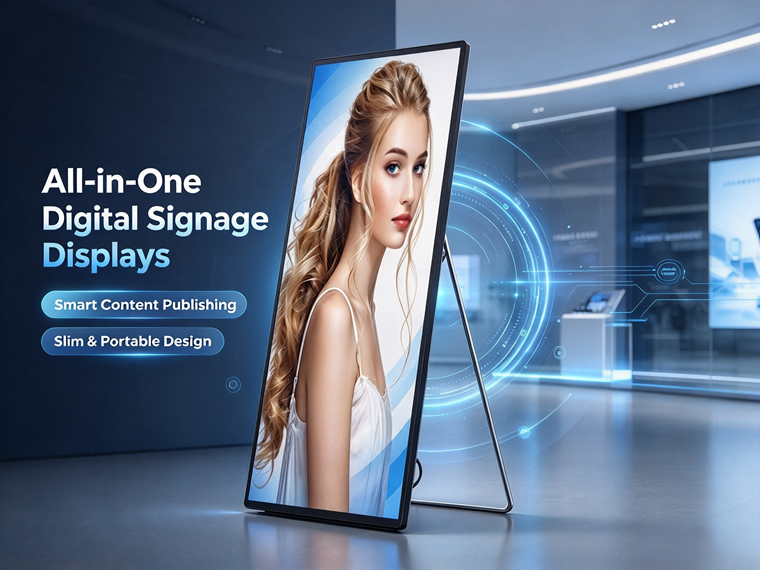
In-store marketing is the most common application for all-in-one digital signage displays. Restaurant chains, beauty stores, clothing stores, and cell phone shops mostly opt for wall-mounted all-in-one digital signage displays, placing them at the entrance or next to the cash register. These displays can cycle through posters for new products, promotional offers, and set menus. Content doesn’t need to be reprinted each time—it can be replaced remotely with a single click from the backend, making it very convenient to update promotional materials for seasonal changes or special events. Compared to paper posters, the visuals are more eye-catching, and the displays can be used repeatedly over the long term, saving on material costs.
Office buildings, elevator lobbies, and main lobbies are suitable for freestanding or ultra-thin wall-mounted all-in-one digital signage displays. Corporate lobbies are ideal for showcasing corporate culture, welcome messages, and corporate promotional videos; in elevator lobbies, all-in-one digital signage displays can display notices, investment opportunities, and brand advertisements, making them suitable for industrial parks, commercial buildings, and hotel lobbies. Since touch functionality is rarely required in these settings, start by selecting non-touch all-in-one digital signage displays, which are stable, durable, and capable of continuous playback for 7×16 hours.
For exhibition halls and venues, touchscreen all-in-one digital signage displays are recommended. In museums, corporate exhibition halls, and planning exhibition centers, freestanding touchscreen all-in-one digital signage displays can serve as self-service information kiosks, allowing visitors to tap the screen to independently browse product descriptions, project materials, and text, images, and videos—replacing manual guided tours. They can also be paired with standard all-in-one digital signage displays to loop promotional videos, combining dynamic and static content to enhance the exhibition space’s high-tech feel and visitor experience.
Government service centers, bank branches, and hospital triage lobbies make extensive use of all-in-one digital signage displays. On one hand, they broadcast service guides, policy announcements, and safety awareness videos; on the other hand, touchscreen all-in-one displays provide self-service information inquiries and ticket-number guidance, alleviating pressure on service counters and reducing the need for staff to repeatedly answer the same questions. These scenarios demand high stability and require support for long-term, uninterrupted operation.
Campuses and training institutions are also ideal settings for all-in-one digital signage displays. In school hallways, cafeterias, and classroom building lobbies, wall-mounted all-in-one digital signage displays can be used to broadcast campus announcements, safety information, and profiles of outstanding students; training institutions can use them to showcase their curriculum, introduce faculty, and promote new class openings, with flexible and efficient information updates.
Supermarkets, convenience store chains, movie theaters, and gyms are also popular settings. All-in-one digital signage displays can be used in supermarket aisles and at specialty counters to promote sales events; in gyms to display class schedules and instructor profiles; and in movie theaters to show movie trailers on a loop. Freestanding all-in-one digital signage displays offer flexible placement—they do not require wall mounting, making it easy to reposition them later.
When selecting a model, the distinction is simple: if you only need to display promotional videos and posters, choose a non-touch All-in-One digital signage display; if you require self-service inquiries and interactive operations, opt for a touch-enabled All-in-One digital signage display. Additionally, consider the installation environment—wall-mounted models save space, while freestanding models offer greater flexibility for relocation.
In summary, all-in-one digital signage displays are a viable option for any scenario requiring ongoing promotions, information displays, or self-service inquiries. Before purchasing, confirm the installation location, whether touch functionality is needed, and the daily operating hours; then choose between the Android or Windows operating system to maximize the value of your all-in-one digital signage displays.
Related News
- What protective features should outdoor sports field displays have?
- What common pitfalls should you avoid when purchasing indoor fine-pitch displays?
- High-Quality Conference Displays: How to Choose an Indoor LED Display?
- What are the advantages of purchasing outdoor LED displays directly from the manufacturer?
- How to Choose a Manufacturer for Stadium LED Displays: Key Tips for Avoiding Pitfalls in Project Procurement?
- How Do Stadium LED Displays Balance Viewing Quality and Durability?
Leave me a message




News Recommendations