English
- English
- Español
- Português
- русский
- Français
- 日本語
- Deutsch
- tiếng Việt
- Italiano
- Nederlands
- ภาษาไทย
- Polski
- 한국어
- Svenska
- magyar
- Malay
- বাংলা ভাষার
- Dansk
- Suomi
- العربية
- हिन्दी
- Pilipino
- Türkçe
- Gaeilge
- Indonesia
- Norsk
- تمل
- český
- ελληνικά
- український
- Javanese
- فارسی
- தமிழ்
- తెలుగు
- नेपाली
- Burmese
- български
- ລາວ
- Latine
- Қазақша
- Euskal
- Azərbaycan
- Slovenský jazyk
- Македонски
- Lietuvos
- Eesti Keel
- Română
- Slovenski
- मराठी
- Srpski језик

News
High-Quality Conference Displays: How to Choose an Indoor LED Display?
In the era of digital conferencing, indoor LED displays have become the mainstream display equipment in high-end conference rooms and auditoriums. Many buyers focus solely on pixel pitch and price when selecting a model, overlooking the specific requirements of conference settings. As a result, issues such as moiré patterns, uneven color reproduction, and screen stuttering often arise after installation. In this article, the Allenson editorial team explains the key considerations for selecting indoor LED displays based on actual conference scenarios, helping businesses choose suitable and reliable large-screen displays for their meetings.
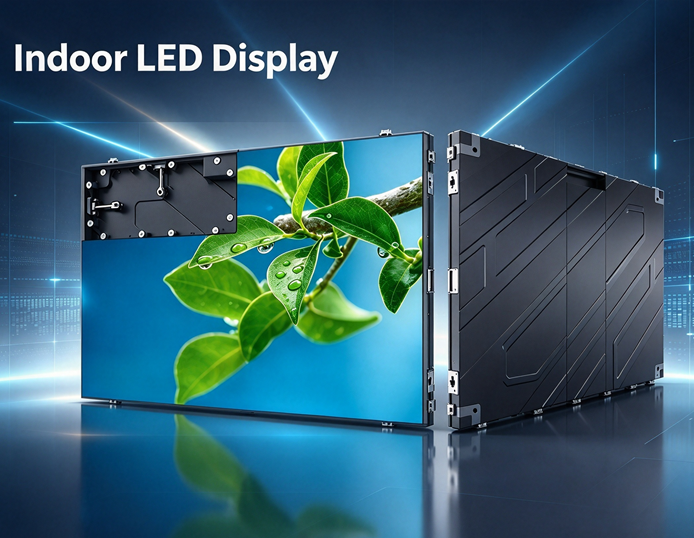
In corporate conference rooms, multipurpose auditoriums, and remote conference rooms, indoor LED displays are gradually replacing traditional projectors and LCD video walls thanks to their seamless splicing, excellent image depth, and suitability for extended screen display. However, there is a wide variation in the quality of indoor LED displays on the market, and quotes for the same specifications can vary significantly. To select a high-quality, meeting-specific large screen, one cannot simply compare prices; instead, a comprehensive assessment must be made based on the on-site environment and usage requirements.
The first step in selection is to choose the appropriate pixel pitch based on the viewing distance; do not blindly pursue Indoor LED Displays with smaller pixel pitches. Pixel pitch determines image clarity and directly impacts the budget. For small conference rooms with a viewing distance of 2–3 meters, start with P1.25 or P1.5; for medium-sized conference rooms with a viewing distance of 3–5 meters, P1.5 and P1.86 offer better overall performance; for large lecture halls with a viewing distance of 5 meters or more, P2.0 and P2.5 offer better value for money. Choosing a smaller pixel pitch than required for the viewing distance will result in a clarity improvement that is barely perceptible to the naked eye, leading only to a waste of budget.
Second, focus on the refresh rate and grayscale levels to address the moiré pattern issue during video conferences and video recording. During meetings, it is common to connect online or record footage with a camera or smartphone; standard screens with low refresh rates are prone to horizontal stripes. For indoor LED displays used in meetings, a refresh rate of 3,840 Hz or higher is recommended, paired with 16-bit grayscale. A high refresh rate helps prevent moiré patterns during recording, while high grayscale ensures natural transitions in PowerPoint gradient charts and skin tones, preserves clear details in dark areas, and prevents blocky or grayish artifacts, guaranteeing realistic and stable video conferencing visuals.
Many buyers fall into the misconception that the higher the brightness of an indoor LED display, the better the effect. Since meeting rooms typically have soft lighting, excessively high brightness can be glaring and lead to visual fatigue during prolonged meetings. For meeting-specific indoor LED displays, recommended brightness should be between 300–500 cd/m², with stepless dimming to allow flexible adjustment based on the room’s lighting conditions. Additionally, manufacturers should perform pixel-by-pixel calibration before shipment to ensure uniform brightness and color across the entire screen, thereby preventing issues such as uneven brightness or color blocks.
The accompanying control system is another aspect that is often overlooked. The display itself is merely the foundation; the video processor and transmission cards determine the user experience. A high-quality solution supports wireless screen mirroring, multiple signal inputs, and split-screen display. It enables seamless switching between signals from computers, conference cameras, and USB drives—without black screens or lag—thereby preventing equipment failures from disrupting the meeting’s progress.
In terms of structure, prioritize front-access maintenance. Most conference rooms are installed flush against walls, with little to no space reserved for rear maintenance; front-access indoor LED displays make it much easier to service modules and power supplies. Additionally, select a silent cooling solution, and ensure the power supply and drivers use engineering-grade components suitable for prolonged continuous operation. Screen aspect ratios should ideally be planned in 16:9 to match computer screen mirroring and video conferencing aspect ratios, preventing image stretching or distortion.
In summary, when selecting an indoor LED display for conference rooms, prioritize the specific needs of the setting and strike a balance between clarity, camera compatibility, viewing comfort, stability, and budget. For companies without prior selection experience, it is recommended to consult a professional manufacturer and provide details such as the conference room dimensions, viewing distance, and live streaming requirements. Only after obtaining a customized solution and comparing quotes can you select a suitable, high-quality conference display.
Related News
- What protective features should outdoor sports field displays have?
- In which scenarios are all-in-one digital signage displays suitable for use?
- What common pitfalls should you avoid when purchasing indoor fine-pitch displays?
- What are the advantages of purchasing outdoor LED displays directly from the manufacturer?
- How to Choose a Manufacturer for Stadium LED Displays: Key Tips for Avoiding Pitfalls in Project Procurement?
- How Do Stadium LED Displays Balance Viewing Quality and Durability?
Leave me a message



News Recommendations